WordPress and NetBeans

Here’s a few tips for how to make the most out of NetBeans for developing WordPress websites.

Making NetBeans aware of WordPress functions so it can suggest autocompletion

Working with WordPress, I often have to look up how to use a function I’ve used before, but have forgotten the order of parameters. The codex, and in particular the WordPress function reference and WordPress template tags reference pages are great places to look for such things. However, if you set up NetBeans to be aware of the WordPress functions, sometimes you can save yourself a trip to the codex. NetBeans is by default aware of any functions defined within any files in your PHP include path, as well as any functions you have defined in your project. One way to make NetBeans aware of the WordPress functions would be to have WordPress core within your project, but I would prefer to not have it there. When working on files on remote servers, main reason I would use NetBeans over vim, it is a little bit cumbersome to download all of WordPress core, and I usually only download what I need from wp-content. In such a scenario, you can teach NetBeans to also load a local copy of WordPress into memory. To teach it that, go to Tools -> Options, then PHP tab.

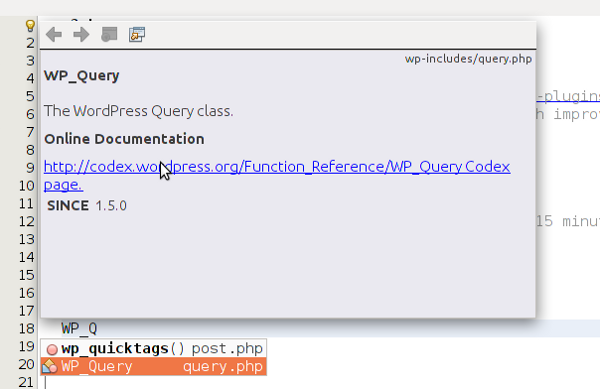
Code completion will then be enabled, and the PHPDocs in WordPress will be parsed shown when looking at the available functions. In the picture below, I typed ‘WP_Q’ and the autocomplete functions became available below it, as well as the documentation dialog above it.
WordPress Coding Style Adherence

The WordPress coding standard defines how your code should look so that it looks the same as the code in WordPress core. Adhering to a coding standard is a good idea because it promotes consistency and makes for easier reading of the code you write. I’ve prepared an export of the Netbeans configuration for the editor to adhere to the WordPress coding standard. I hope you find it useful! To import it, Click Tools -> Options in the top menu, then press the “Import” button in the dialog window that comes up and follow the instructions there.

What’s Next?

A nice feature that is not available to the extent of my knowledge would be templates for common WordPress files, like there are template for Java classes, and such. The way this would work is you could say “I’m going to make a new theme” and it would create all the files a theme requires. Or “I’d like to make a widget.”, “I’d like to write a shortcode.” and NetBeans would create the “boilerplate” code so you can get to coding right away.

Do you have any NetBeans tips you’d like to share with your fellow WordPress site builders? Do you know of a plugin for NetBeans that adds those templates I mention in the section above? Thanks for reading.

Patch for JWPlayer

I made a website for the Positive Parenting Program of the Manitoba Government while working at Canada’s Web Shop, and it had videos on one of the pages. Because the videos are self-hosted, I used the excellent JWPlayer for WordPress plugin, and it worked great except that when the staging site was brought down the videos stopped working.

It turns out that JWPlayer for WordPress is using WordPress guids instead of using the wp_get_attachment_url() function that makes it safe to move your WordPress website between domains. In short, the guid column in the posts table stores the original URL of the video, and if you change domains, the only way to get the correct URL is to use the aforementioned function.

I wrote a little patch, notified LongTail Video, and it is on its way to being included in the plugin.

My GitHub Resume

Since I’m using GitHub for the ProjectPier work I’m doing, one of my senior colleagues at Tactica mentioned that GitHub has a resume creation app, that nicely showcases the different work a developer does through their service. Here’s my GitHub resume.

I tweeted about that, and the always friendly Web Development Instructor at Red River College, Kyle Geske, replied with a link to his GitHub resume.

A GitHub resume, based on a history of code commits that a developer has made can be a valuable resource to use when looking for a new job, because it shows the ability to develop software.

Create yours and link it here if you please! Oh, and you can fork the code and contribute enhancements.

Project Pier & Kamp Pro 2 on GitHub

I’m working with and on the Project Pier project management software again.

A colleague who was working as a project manager recently left Tactica, and I saw this as an opportunity to do more project management myself, which is what I’m always looking for opportunities for.

This week was really exciting for my project management efforts, but it also means I have to play a little bit of catch up with the development projects at work, since the project management work I do takes away time from development.

You can check out my GitHub fork of Project Pier to follow my development or get the latest version to use it for your project management needs. If you find a bug or have an idea for how to make the system better, I’d love to hear about it, and if I feel it would make the system better for me, it’s likely I will have a patch for it shortly.

For my needs, the part of project pier needing most attention is the UI. The architecture seems solid, and the project management paradigm is quite close to the one Basecamp implements.

To address the UI issues without forcing my ideas into the core, I’ve enabled the themes to overwrite any output of the system (HTML & Javascript), whereas they were only able to overwrite CSS & images before. You can follow my UI changes on my GitHub repository of the Kamp Pro 2 theme developed by the talented Andrew Dotson.

RecipePress WordPress Recipe Plugin Project

As of recently, I am the main support person for the RecipePress WordPress plugin.

Over the last 6 months I’ve built and helped others build at least 5 recipe-based websites. Here’s a list:

Since all of them are using the RecipePress WordPress plugin, I ran into a bug, contacted the project owner, and it turned out he is looking to step down. Since I am always looking for successful PHP-based free software projects to contribute to, I think this is a great opportunity for me.

Here’re some useful links for RecipePress users:

New iPhone

I’ve finally bought my first cell phone. Which reminds me I also just bought my first car.

I bought an iPhone 4s as a replacement for my wife’s iPhone I lost earlier in the year, but then she ordered an iPhone 4 herself, so I have a smart phone!

I’m hoping to get more in touch with mobile computing and development for this emerging platform.

The number is 204-894-8346 in case you’re wondering. Other contact information is at http://gravatar.com/dbernar

The Village Idiot / The Ice Breaker

When I was younger, I used to go to mini-raves in the various clubs in Zagreb, I liked to dance, and the evening was more or less enjoyable based on various things. One evening I went to a club and there was a smaller crowd, so you could see everyone around you and the lighting was a little bit stronger than usual, so everyone felt a little bit self-conscious and most people weren’t dancing, making it a poor party. In a little bit, an older guy showed up on the dancefloor, and started doing some weird-looking funny dance, but it broke the ice and everyone slowly started to dance and enjoy themselves more, and it turned out to be a great night.

I like to credit myself for breaking the ice at both companies I’ve worked at recently (Canada’s Web Shop & Tactica) , and I think my “Village Idiot”-like appearance and attitude facilitates this quite well, because since I am sincere about who I am, the others lower their guard, and so we are able to see each other as normal people we can identify with.

What do you think about my claim? Do you have any similar experience like this? Do you have a different theory to explain this?

Thanks for reading.